Exo AI Build Your Own Distributed AI Supercluster at Home

Your Home, Your AI Supercluster: Unleashing Exo AI!
I. Intro: The Future of AI is in Your Living Room
Imagine running massive AI models without needing a data center or a supercomputer. What if your everyday devices—your phone, laptop, even your smart watch—could team up to create a powerful AI brain? This isn't science fiction; it's the promise of Exo AI.

Meet exo, the groundbreaking open-source project from exo labs that's letting you build your own distributed AI cluster right at home. Stop relying on expensive cloud services or single, beefy machines. Exo AI pools your devices' power, allowing you to run bigger AI models and get results faster than ever, democratizing local AI inference for everyone.
II. How Exo Works Its Magic: A Peek Under the Hood
Getting started with your Exo AI cluster is surprisingly simple. Exo automatically finds and connects all your devices running the software. Seriously, it's plug-and-play simple, transforming your consumer electronics into a personal AI supercluster.
The Speed Demon: RDMA over Thunderbolt 5
This isn't just fast; it's blisteringly fast. Exo AI leverages the latest Thunderbolt 5 technology to slash communication latency between devices by up to 99% using RDMA (Remote Direct Memory Access)! Think of it as a dedicated AI autobahn for your data, crucial for efficient distributed AI operations.
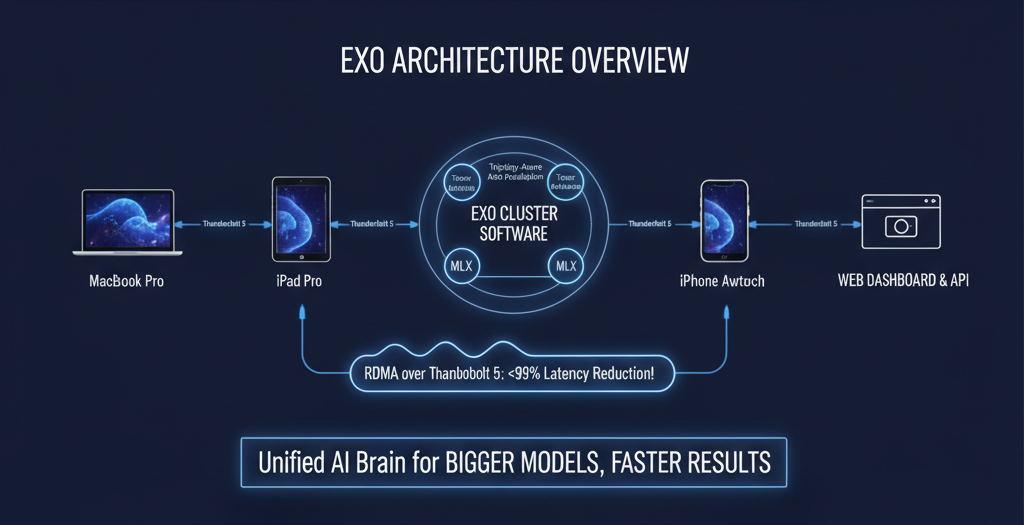
Exo's a Smart Cookie: Topology-Aware Auto Parallelism
Your Exo AI cluster isn't just a jumble of devices. Exo intelligently maps out your hardware, understanding each device's computational power and network connectivity. Then, it strategically splits and distributes AI models for maximum efficiency and optimal local AI inference.
Brain Splitting for Super Speed: Tensor Parallelism
Forget bottlenecks! Exo AI shards model components across devices using tensor parallelism, leading to some impressive speedups (we're talking 1.8x faster on 2 devices, 3.2x on 4!) for complex AI models.
Apple Silicon's Best Friend: MLX Support
Built on Apple's optimized MLX framework, Exo AI ensures your Macs are firing on all cylinders for AI inference, fully leveraging the power of Apple Silicon.
Your Command Center: Web Dashboard & API
Keep tabs on your Exo AI cluster and interact with it through a user-friendly web dashboard or a straightforward API. Monitoring your home AI lab has never been easier.
III. The Good, The Bad, and The Byte-y: Exo's Pros & Cons
Why You'll Love Exo (The Good):
- AI for Everyone! Democratizing powerful AI by using hardware you already own, making local AI inference accessible.
- Big Models, Small Spaces! Run AI models that would typically be too large for a single consumer device, turning your home into an AI supercluster.
- Blazing Fast Performance! Thanks to RDMA over Thunderbolt 5, your Exo AI cluster flies, achieving unprecedented speeds for distributed AI.
- Set It and Forget It! Easy setup and intelligent automation mean less fiddling, more inferring with your Exo AI system.
- Cutting-Edge Cred: Early adoption of Thunderbolt 5 and MLX on Apple Silicon puts Exo AI at the forefront of local AI innovation. (Shoutout to Jeff Geerling's benchmarks on Mac Studio clusters for those massive models!)
Why You Might Grumble (The Cons):
- Mac-Heavyweight Champion (for now): The best performance (RDMA) is currently tied to Thunderbolt 5-equipped Macs, limiting initial widespread adoption for optimal Exo AI performance.
- Linux Users: Patience, Young Padawans: Currently, Linux support for Exo AI is CPU-only. GPU acceleration is in the works, but not here yet, meaning less optimal distributed AI on Linux.
- macOS Specifics: A Little Bossy? The macOS app might ask for system permissions to modify network settings for optimal RDMA and Exo AI operation.
- Still a Youngster! While rapidly developing, Exo AI is a relatively new project, so expect ongoing evolution in stability and documentation. Check the Exo GitHub repository for the latest updates and contributing guidelines.
IV. Roll Up Your Sleeves: Getting Started with Exo AI
The Easiest Path: macOS App
Download the DMG from the official Exo releases page, drag and drop – done! (Requires macOS Tahoe 26.2+). This is the quickest way to deploy Exo AI.
For the DIY Enthusiast: Run from Source (macOS & Linux)
Prerequisites: Homebrew (Mac), uv, node, rust (nightly toolchain). Linux users will grab nodejs and npm via apt. Refer to the Exo documentation for detailed setup.
Quick Install & Run (Mac/Linux):
git clone https://github.com/exo-explore/exo
cd exo/dashboard && npm install && npm run build && cd ..
uv run exo
Linux Note: Remember, it's CPU-only for now! Keep an eye on the Exo GitHub for GPU support updates.
Unlock Super Speed: Enabling RDMA on macOS (Thunderbolt 5 Macs only)
A quick trip to Recovery mode and a simple rdma_ctl enable command will supercharge your Mac, enabling peak Exo AI performance through Thunderbolt 5.
Your First AI Conversation: Using the Exo API
Step 1: Preview model placements: See where your model can run best on your Exo AI cluster.
curl "http://localhost:52415/instance/previews?model_id=llama-3.2-1b"
Step 2: Create a model instance: Bring your chosen model to life on your Exo AI cluster.
curl -X POST http://localhost:52415/instance -H 'Content-Type: application/json' -d "..." # Use output from preview
Step 3: Send a chat completion: Have a conversation with your home AI lab!
curl -N -X POST http://localhost:52415/v1/chat/completions \
  -H 'Content-Type: application/json' \
  -d '{ "model": "mlx-community/Llama-3.2-1B-Instruct-4bit", "messages": [...] }'
Step 4: Clean up: Delete the instance when you're done, freeing up resources on your Exo AI setup.
V. What the Tech World's Saying About Exo
With over 38,000 GitHub stars, Exo AI is clearly hitting a nerve in the tech community, showcasing immense interest in distributed AI and local AI inference. It's an actively developed project by exo labs, backed by a vibrant community of contributors. The Exo AI project welcomes contributions; check their CONTRIBUTING.md file.
Benchmarks from trusted figures like Jeff Geerling confirm that Exo AI delivers tangible performance gains for heavy-duty AI models on Mac Studio clusters, particularly when leveraging Thunderbolt 5 and Apple Silicon.
The verdict? Exo AI is a promising, forward-thinking solution for anyone keen on local AI inference, especially those with cutting-edge Apple Silicon hardware. While Linux GPU support is still a frontier, the excitement for this distributed AI project is palpable!
Image: A stylized depiction of multiple consumer devices (laptop, phone, tablet) connected by glowing lines, forming a central "AI brain." Alt text: "Exo AI distributed supercluster, multiple Apple Silicon devices connected by Thunderbolt 5 for local AI inference."